In this article we'll show you how to set up an outgoing appointment. You'll have the possibility to either invite your customer and let them pick a time and date. Or when you already know what works for both of you, to simply select a time and date yourself.
When you send out an appointment, your client will be notified and automatically reminded when the meeting time approaches.
- Setting up a new outgoing appointment
- I want to send an invite to a new customer, is that possible?
- Where can I find an overview of my outgoing meeting invititations?
- My client didn't answer my invitation. Can I resend the invite?
- Can the customer still cancel or change the appointment?
Setting up a new appointment
How to:
- Go to Calendar > Schedule a new appoitnment
- Decide whether you chose the hour or you send an invite to your customer so he can decide
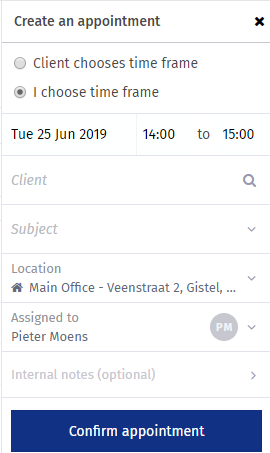
- Select an appointment subject and client, or create one
- Confirm the appointment and al notifications will be send to your customer
Save all your selections, hit the 'SEND' button and your customer will be notified automatically combined with an update of your calendar!
I want to send an invite to a new customer, is that possible?
With the 'New Meeting button in the navigation menu it is possible to send an invite to everyone by means of an email address.
How to:
- Go to Navigation > New Meeting
- Click on the 1st step: "Who are you meeting with?"
- Click on the "didn't find who you were looking for?" button
- Enter the details of the person you want to send an appointment invite
- Complete the previous 'Setting up a new appointment" steps to send out the invitation
Where can I find an overview of my outgoing meeting invitations?
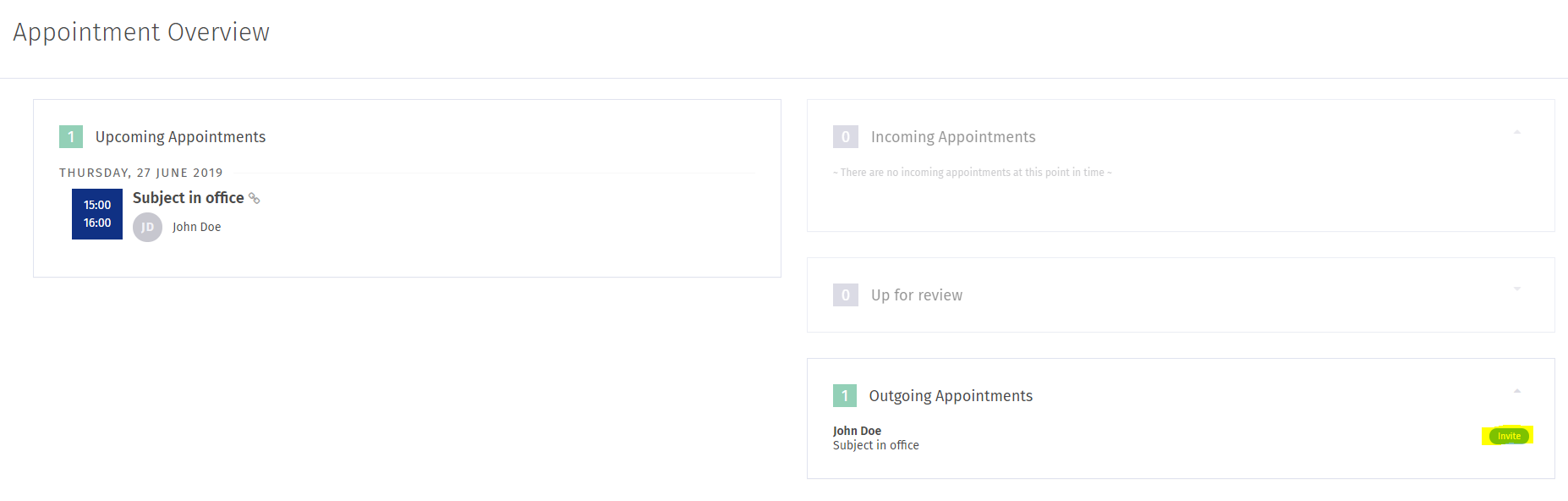
How to:
- Go to Navigation > Appointments
- You can find an overview of your outgoing invitations and requests in the right column.
- Click on an appointment to see its details.
For more info on appointment options go to managing your appointments.
My client didn't answer my invitation. Can I resend the invite?
When a client didn't answer an invitation, you can always resend an appointment invitation.
How to:
- Go to Navigation > Appointments > Outgoing appointments
- Click on the desired appointment
- Click on the 'Ask client for another suggestion' button
Can the customer still cancel or change the appointment?
When a customer receives an appointment invitation or confirmation by mail, there's always an option included for the customer to cancel the appointment or suggest another time and date.
From within the mail, the customer can click a link to either cancel or reschedule the appointment or the meeting request.